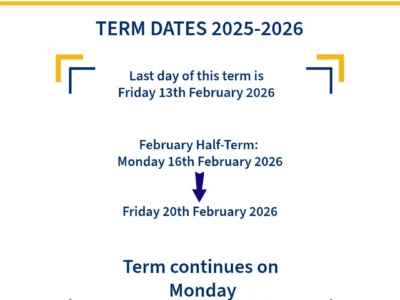
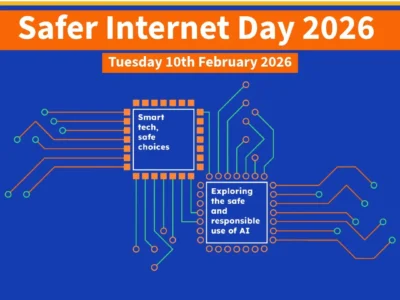
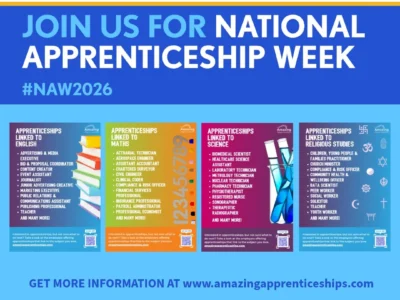
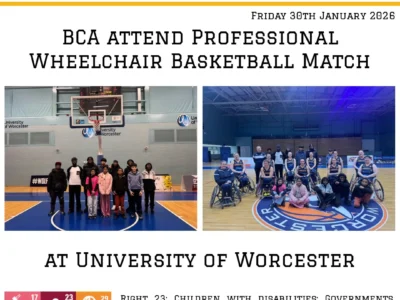
Dates for your diary – January 2026
Look out for confirmation and consent* letters or emails nearer the date, these will contain the full information you need. *where
Read More...Home » News

Look out for confirmation and consent* letters or emails nearer the date, these will contain the full information you need. *where
Read More...
Year 8 took part in a Future Engineers session on Thursday 8th January. The session delivered by In-Comm Training was designed to get students collaborating in teams to solve engineering problems using the tools given. It was a fun way to bring learning to life whilst also exploring routes into engineering through apprenticeships. Thanks, as ever, to In-Comm for an engaging
Read More...
On Wednesday 7th January, a group of Year 7 students who form part of the Eco Committee took part in the RSPB Birdwatch.They had a great afternoon walking around the school site spotting all the different wildlife, but especially birds, that share the school with us. The most prevalent bird species spotted was the Magpie. The results have been submitted to the RSPB and the Eco-Committee were awarded a certificate of participation.Later this year the Eco-Committee will be looking at how birds fit into the story of creation linking to our Christian ethos.Thank you to Mrs Virk for supporting our students with this fun and engaging expedition.Right 15- children can join or set up groups. Right 17- access to education.[video width="1080" height="1080"
Read More...
Upcoming free sessions are on Wednesday 21st January, 7.30pm -8.30pm and Saturday 24th January, 10am-11am in Pelsall. Contact events@walsallcfr.org.uk direct for further information.Thank you to FASTAID and Walsall Council for creating this poster and allowing us to share
Read More...
Welcome to Arbor! Blue Coat Academy Church of England is using Arbor and has set up an account for you.To finish creating your account, you just need to set a password. You can do this by going to login.arbor.sc, clicking on ‘Forgotten Password?’ and following the instructions on screen.Your username is the email you have registered with us.Via this app you can: • View attendance, exam timetables and reports in real-time • Receive notifications about important school announcements, events and calendar dates. • Report any absences directly to us • Update your own contact detailsArbor App- Logging same-day absencesAn easy 3-step process: 1. Access the Attendance section 2. Input the absence details 3. Submit the request Once approved, it will be visible in the Attendance tab.For more information on logging student absences please visit https://support.arbor-education.com/hc/en-us/articles/19947254592029-Logging-absences-on-the-Parent-Portal-and-Arbor-AppLogin information for the Arbor Parent Portal/App has been sent out to parents/carers, if you need us to resend your log in information please contact the
Read More...
Three weeks ago, on 18th December 2025, the school hall came alive with dance, drama and music during the Winter Showcase. There were solo and group performances, including instruments and the school choir. We are incredibly proud of every one who took part.Right 31- the right to rest, relax, play and to take part in cultural and creative activities.[video width="1080" height="1920"
Read More...
Three weeks ago, on 17th December 2025, we held an in-house Talent Show. Our wonderful pupils were brave enough to get on the stage to sing, dance and act in front of a packed school-hall and our student judges. It was a fun and enjoyable time for all. Well done to all our performers, you are all stars!Right 13- share freely what they learn, think and feel by talking, drawing, writing or in any other way. Right 15- children can join or set up groups. Right 29- children’s education should help them fully develop their personalities, talents and abilities and to respect other people’s rights, cultures and differences. Right 31- the right to rest, relax, play and to take part in cultural and creative
Read More...
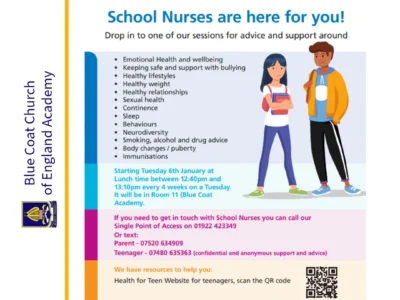
Drop in to one of our sessions for advice and support around • Emotional Health and wellbeing • Keeping safe and support with bullying • Healthy lifestyles • Healthy weight • Healthy relationships • Sexual health • Continence • Sleep • Behaviours • Neurodiversity • Smoking, alcohol and drug advice • Body changes / puberty • ImmunisationsStarting Tuesday 6th January at Lunch time between 12:40pm and 13:10pm every 4 weeks on a Tuesday. It will be in Room 11 (Blue Coat Academy) If you need to get in touch with School Nurses you can call our Single Point of Access on 01922 423349 Or text: Parent - 07520 634909 Teenager - 07480 635363 (confidential and anonymous support and advice.Health for KidsHealth for TeensThank you to NHS and Walsall NHS Healthcare Trust for creating this poster and allowing us to share it within this Story and accompanying
Read More...
Before the Christmas/New Year break the whole Academy came together in true Blue Coat spirit to donate to Ablewell Advice.As you can see, we have a whopping five-tables full of boxes filled to the brim.Thank you to Mrs Homer for organising and delivering it all and thank you to everyone who donated- even one item will have made an impact to someone in need.Rights 6, 26 and 27 are represented here. (Right 6: Life, Survival and Development, Right 26: Social and Economic Help, Right 27: Food, Clothing, A Safe Home)[video width="1080" height="1080"
Read More...
Three weeks ago, on 15th December 2025, BCA had the pleasure of welcoming some of the local community to school for the annual OAP Christmas Party. This is an evening where the whole Academy gets involved- whether it be with donations, decorating the hall, wrapping gifts, greeting guests or being present for the event itself. There were games, performances, tasty food and even a life-sized Gingerbread Man making an appearance! The night was a lovely way to bring people together and start the festive period.Right 29, children’s education should help them fully develop their personalities, talents and abilities and to respect other people’s rights, cultures and
Read More...Blue Coat Church of England Academy
We firmly believe that the internet should be available and accessible to anyone, and are committed to providing a website that is accessible to the widest possible audience, regardless of circumstance and ability.
To fulfill this, we aim to adhere as strictly as possible to the World Wide Web Consortium’s (W3C) Web Content Accessibility Guidelines 2.1 (WCAG 2.1) at the AA level. These guidelines explain how to make web content accessible to people with a wide array of disabilities. Complying with those guidelines helps us ensure that the website is accessible to all people: blind people, people with motor impairments, visual impairment, cognitive disabilities, and more.
This website utilizes various technologies that are meant to make it as accessible as possible at all times. We utilize an accessibility interface that allows persons with specific disabilities to adjust the website’s UI (user interface) and design it to their personal needs.
Additionally, the website utilizes an AI-based application that runs in the background and optimizes its accessibility level constantly. This application remediates the website’s HTML, adapts its functionality and behaviour for screen-readers used by the blind users, and for keyboard functions used by individuals with motor impairments.
If you’ve found a malfunction or have ideas for improvement, we’ll be happy to hear from you. You can reach out to the website’s operators by using the following email postbox@bluecoatacademy.org.
Our website implements the ARIA attributes (Accessible Rich Internet Applications) technique, alongside various different behavioural changes, to ensure blind users visiting with screen-readers are able to read, comprehend, and enjoy the website’s functions. As soon as a user with a screen-reader enters your site, they immediately receive a prompt to enter the Screen-Reader Profile so they can browse and operate your site effectively. Here’s how our website covers some of the most important screen-reader requirements, alongside console screenshots of code examples:
Screen-reader optimization:we run a background process that learns the website’s components from top to bottom, to ensure ongoing compliance even when updating the website. In this process, we provide screen-readers with meaningful data using the ARIA set of attributes. For example, we provide accurate form labels; descriptions for actionable icons (social media icons, search icons, cart icons, etc.); validation guidance for form inputs; element roles such as buttons, menus, modal dialogues (popups), and others. Additionally, the background process scans all of the website’s images and provides an accurate and meaningful image-object-recognition-based description as an ALT (alternate text) tag for images that are not described. It will also extract texts that are embedded within the image, using an OCR (optical character recognition) technology. To turn on screen-reader adjustments at any time, users need only to press the Alt+1 keyboard combination. Screen-reader users also get automatic announcements to turn the Screen-reader mode on as soon as they enter the website.
These adjustments are compatible with all popular screen readers, including JAWS and NVDA.
Keyboard navigation optimization:The background process also adjusts the website’s HTML, and adds various behaviours using JavaScript code to make the website operable by the keyboard. This includes the ability to navigate the website using the Tab and Shift+Tab keys, operate dropdowns with the arrow keys, close them with Esc, trigger buttons and links using the Enter key, navigate between radio and checkbox elements using the arrow keys, and fill them in with the Spacebar or Enter key. Additionally, keyboard users will find quick-navigation and content-skip menus, available at any time by clicking Alt+1, or as the first elements of the site while navigating with the keyboard. The background process also handles triggered popups by moving the keyboard focus towards them as soon as they appear, and not allow the focus drift outside of it.
Users can also use shortcuts such as “M” (menus), “H” (headings), “F” (forms), “B” (buttons), and “G” (graphics) to jump to specific elements.
We aim to support the widest array of browsers and assistive technologies as possible, so our users can choose the best fitting tools for them, with as few limitations as possible. Therefore, we have worked very hard to be able to support all major systems that comprise over 95% of the user market share including Google Chrome, Mozilla Firefox, Apple Safari, Opera and Microsoft Edge, JAWS and NVDA (screen readers), both for Windows and for MAC users.
Despite our very best efforts to allow anybody to adjust the website to their needs, there may still be pages or sections that are not fully accessible, are in the process of becoming accessible, or are lacking an adequate technological solution to make them accessible. Still, we are continually improving our accessibility, adding, updating and improving its options and features, and developing and adopting new technologies. All this is meant to reach the optimal level of accessibility, following technological advancements. For any assistance, please reach out to postbox@bluecoatacademy.org.